PROXY protocol
Forward real player IPs from Infinity-Filter to your backend via the PROXY protocol.
The PROXY protocol is the recommended way to forward the real player IP from Infinity-Filter to your backend. It wraps each connection with a small header containing the original client’s IP and port, so your proxy software can attribute connections to the right player — not to the Infinity-Filter edge.
Why you need real-IP forwarding
Without it, every player connection arrives at your backend with the edge IP as the source. Symptoms:
- Per-IP rate limits, bans and antibot plugins target the edge IP instead of the player.
- LiteBans-style plugins can mass-ban the edge — and lock everyone out.
- Geolocation and analytics on the backend become meaningless.
With it, the backend sees the real player IP as if Infinity-Filter wasn’t there.
How to enable it
PROXY protocol must be enabled in two places in lockstep.
1. On the Backends page
Open Network → Backends. On the right-hand panel, check that PROXY protocol is on (toggle it on if needed).
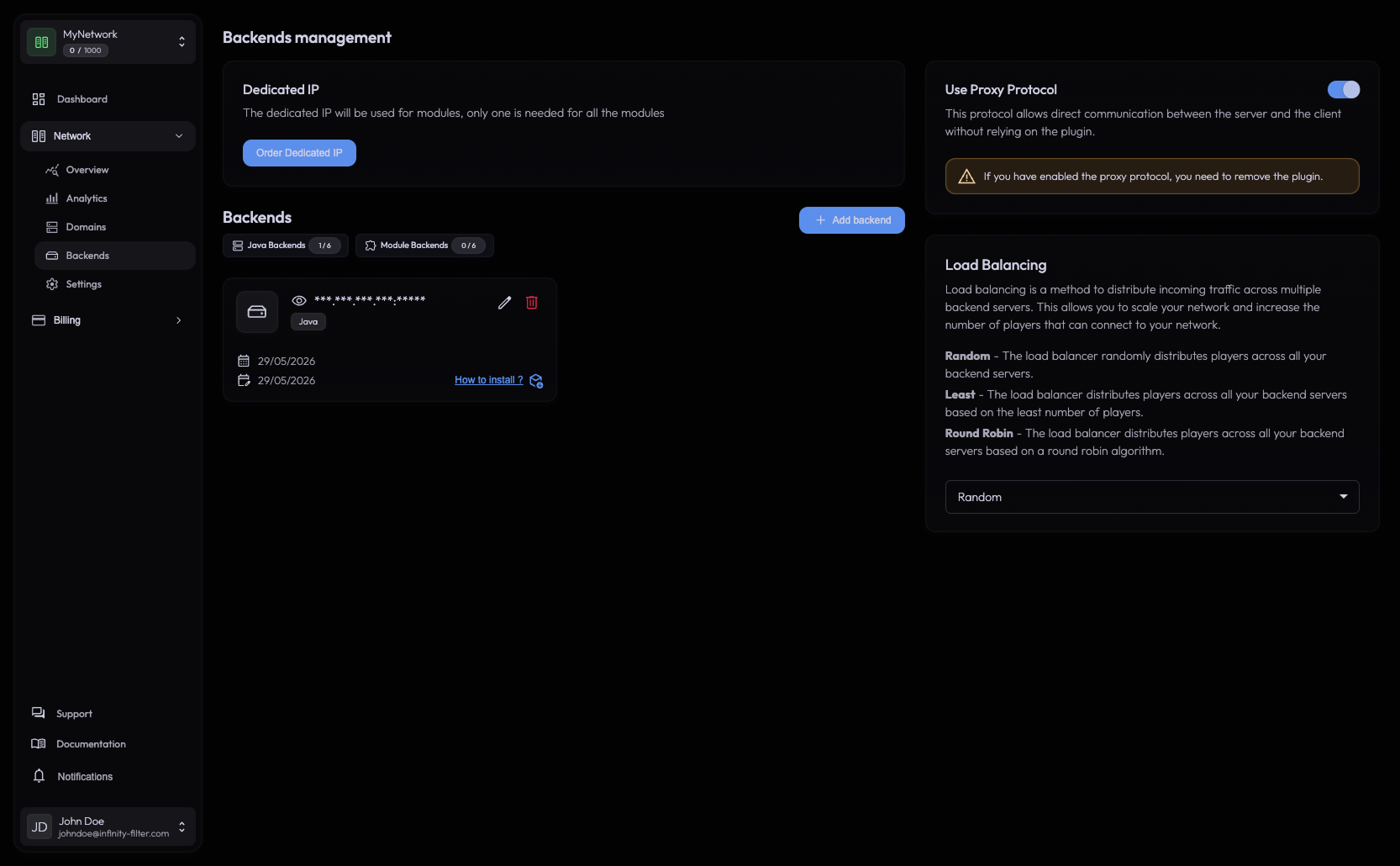
When enabled, the panel shows an alert reminding you to remove the Infinity-Filter plugin if it was installed.
2. In your proxy software
Modern Minecraft proxy software accepts the PROXY protocol header natively — you just flip a config flag. Pick the tab that matches your setup:
Velocity supports inbound PROXY protocol natively via the [advanced] section of velocity.toml. Add or set:
[advanced]
# Accept the PROXY protocol header from Infinity-Filter.
haproxy-protocol = true
Restart Velocity. The flag is documented in PaperMC’s Velocity reference.
BungeeCord supports inbound PROXY protocol natively per-listener. In config.yml, set proxy_protocol: true on the listener facing Infinity-Filter:
listeners:
  - host: 0.0.0.0:25577
    proxy_protocol: true
    # … your other listener options …
Restart BungeeCord.
Paper (including Purpur and other Paper forks) supports inbound PROXY protocol natively — use it when your players hit Paper directly through Infinity-Filter, without a Velocity/BungeeCord proxy in front.
In paper-global.yml:
proxies:
  proxy-protocol: true
Restart Paper. The option is documented in PaperMC’s global configuration reference.
Vanilla Spigot (without Paper) does not support PROXY protocol. The two clean options:
- Upgrade to Paper (drop-in replacement for Spigot) and use the Paper tab above. Recommended.
- Use the Infinity-Filter forwarding plugin instead of PROXY protocol — it works on any Spigot/Bukkit-compatible server. Make sure the PROXY protocol toggle in the panel is off in that case.
A Velocity/BungeeCord proxy in front of Spigot also works — the proxy accepts PROXY protocol from Infinity-Filter, and forwards player info to Spigot via its own native mechanism (BungeeCord guard or Velocity Modern forwarding).
Symptoms when it’s misconfigured
All players show the same IP on the backend PROXY protocol is off (or the plugin is missing). Enable PROXY protocol on both the Backends page and in Velocity/BungeeCord.
Connection drops at handshake PROXY protocol is enabled on only one side. Both sides must agree.
Double-wrap errors / weird disconnects Both PROXY protocol and the Infinity-Filter plugin are enabled. Remove one.
LiteBans mass-bans the proxy IP Real IPs aren't forwarded — admins ban the abuser who is actually the edge. Enable PROXY protocol and remove past mass-bans.
Backend timeouts during high traffic Check compression-threshold parity: Velocity in front set to 256 with the backend set to -1 is destabilising under load.
Bedrock and PROXY protocol
Infinity-Filter always sends the Bedrock player’s real IP to Geyser with the PROXY protocol (on the NetherNet handshake, and on RakNet), whatever the PROXY protocol toggle on the Backends page. On the NetherNet UDP traffic, it only adds it when the separate NetherNet PROXY protocol (UDP) option is on (off by default — see NetherNet PROXY protocol (UDP)). In Geyser’s config.yml (build 1280 or later):
| Setting | Value with IF |
|---|---|
advanced.bedrock.haproxy-protocol-whitelisted-ips | ["https://www.infinity-filter.com/v4/"] — listing our IPs turns the PROXY protocol on for the handshake, and only accepts it from Infinity-Filter |
advanced.bedrock.prefer-signaling-proxy-address | true — take the player’s IP from the handshake (otherwise every player shows an Infinity-Filter IP). false when the NetherNet PROXY protocol (UDP) option is on |
advanced.bedrock.webrtc-proxy-protocol-relays | [] — our IP list only when the NetherNet PROXY protocol (UDP) option is on. Geyser and the option must always match, or Bedrock players can’t join |
bedrock.signaling.advertise-addresses | ["{uid}.ip.infinity-filter.com:19132"] — your dedicated IP hostname, with port 19132 |
advanced.java.use-haproxy-protocol | true only if Geyser runs standalone and your Java proxy has PROXY protocol enabled |
bedrock.signaling.builtin.https | empty — Infinity-Filter serves the certificate, Geyser stays in plain HTTP |
Since Geyser build 1280, advanced.bedrock.use-haproxy-protocol no longer exists: listing IPs in haproxy-protocol-whitelisted-ips is what turns the PROXY protocol on. Geyser migrates an old config automatically (use-haproxy-protocol: true with a whitelist becomes prefer-signaling-proxy-address: true). Even older Geyser configs used bedrock.enable-proxy-protocol, bedrock.proxy-protocol-whitelisted-ips and remote.use-proxy-protocol. See Geyser (Bedrock).
Compression-threshold parity
Independent of PROXY protocol but often confused with it: Velocity and the backend Spigot/Paper must use the same network-compression-threshold value.
A Velocity proxy at 256 in front of a Spigot at -1 is destabilising at high player counts and causes timeout kicks. Keep them equal on both sides.
Switching from the plugin to PROXY protocol
If you currently use the Infinity-Filter plugin and want to switch:
- Toggle PROXY protocol on in the panel.
- Enable
haproxy-protocol = trueinvelocity.toml(or equivalent). - Remove the Infinity-Filter plugin JAR from your backend’s
plugins/folder. - Restart the proxy.
The two cannot coexist — keeping the plugin installed after enabling PROXY protocol will double-wrap connections.
Using the plugin instead
Because PROXY protocol is on by default on new networks, turn the toggle off on the Backends page before installing the Infinity-Filter plugin — only then does the panel show the plugin download and token.
What’s next
Last updated: November 1, 2026