Bedrock domains
Declare the domains your Bedrock players use so Infinity-Filter creates their certificates — required for phones and tablets on NetherNet.
A Bedrock domain is a hostname your players type to join your server through Geyser — for example bedrock.example.com. For each Bedrock domain, Infinity-Filter creates a certificate (Let’s Encrypt), renews it automatically, and serves it on your dedicated IP. You don’t install anything on your server.
Where to find it
Open Network → Domains. The Bedrock domains section sits under the Java domains table. It’s shown when your network has a dedicated IP and Geyser backends using NetherNet.
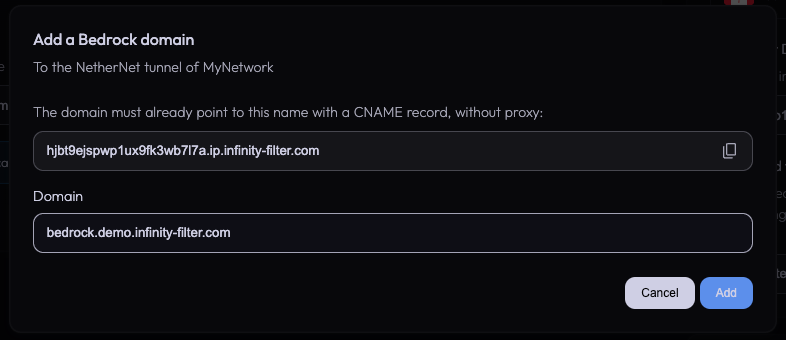
The section shows:
- The number of Bedrock domains used, out of 20.
- DNS setup — the hostname your domains must point to (your dedicated IP hostname,
{uid}.ip.infinity-filter.com). Click the field to copy it. - Your Bedrock domains, each with its certificate status.
- Add a domain, and Validate again when a domain isn’t registered yet.
- A refresh button (top right) to reload the certificate statuses.
Before you add a domain: the CNAME
The domain must already point to your tunnel when you add it. At your DNS provider, create a CNAME record from your Bedrock domain to the hostname shown in DNS setup:
bedrock.example.com. 300 IN CNAME {uid}.ip.infinity-filter.com.
Then check that the record is visible (it usually takes a minute or two):
Use a CNAME to the hostname, not an A record to the IP: if your dedicated IP ever changes, the hostname follows automatically and your domain keeps working without any change on your side.
Adding a domain
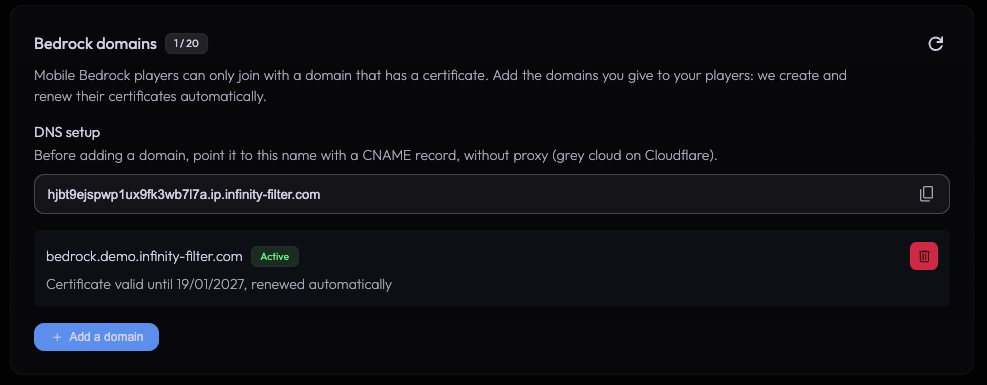
Click Add a domain, type the domain and click Add.
Infinity-Filter then:
- 1
Checks the format
A plain domain name: no IP, no http://, no port. Uppercase letters and a trailing dot are fine.
- 2
Checks the domain is free
A domain used by a network of another account is refused. Your own networks can share it.
- 3
Checks the DNS
The domain must point to your tunnel (the CNAME above).
- 4
Creates the certificate
Usually a few seconds. The domain then shows Active, with the certificate's expiry date.
When the DNS isn’t ready yet
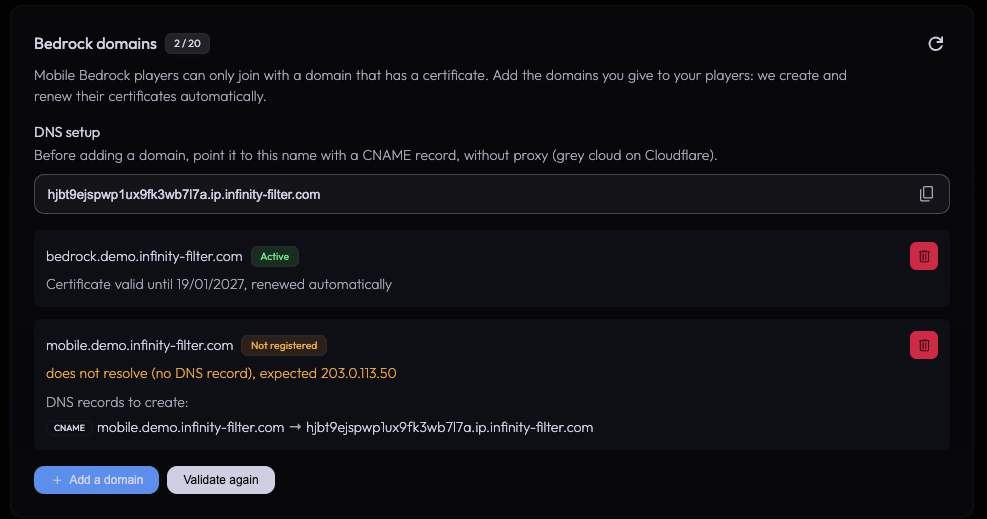
If the domain doesn’t point to your tunnel yet, nothing is saved and the dialog shows the record to create:
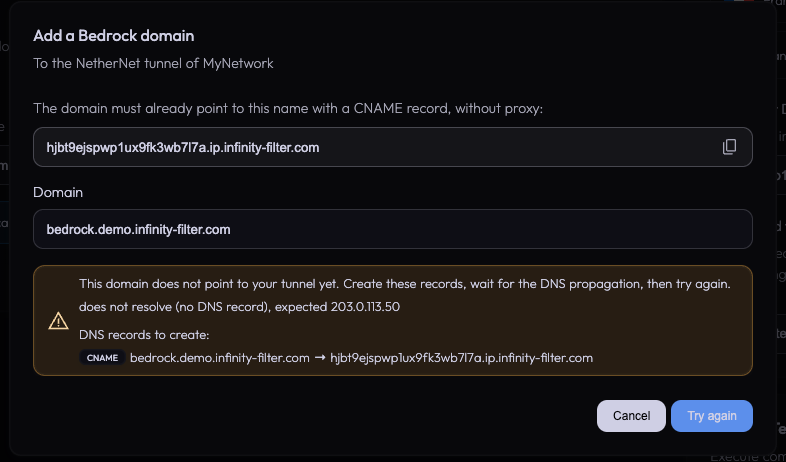
The message tells you what the DNS returns today:
does not resolve (no DNS record) The record doesn't exist yet, has a typo, or hasn't propagated. Create the CNAME and wait a minute.
resolves to …, not … The domain points somewhere else: an old A record, a wrong target, or the Cloudflare orange cloud. Fix the record so it is only a CNAME to your dedicated IP hostname.
DNS lookup failed The domain doesn't exist, or its DNS servers don't answer. Check the domain name and your DNS provider.
Certificate statuses
Active The certificate is served. The date shown is when it expires — it is renewed automatically before that.
In progress The check or the certificate creation is running. Refresh in a few seconds.
DNS error The domain no longer points to your tunnel (DNS changed, record deleted, proxy enabled). Fix the CNAME. If the domain already had a certificate, it keeps being served until it expires, but it can't be renewed.
Error The certificate couldn't be created or renewed. It is retried automatically; the message explains why.
Not registered The domain is saved on your network but has no certificate yet. Fix the DNS, then click Validate again.
Unknown The certificate status is temporarily unavailable. Refresh in a few minutes.
Validate again
A domain can be saved on your network without being registered for a certificate yet — for example after your dedicated IP was renewed or replaced, or when its DNS was wrong at that moment. It then shows Not registered, and a Validate again button appears:
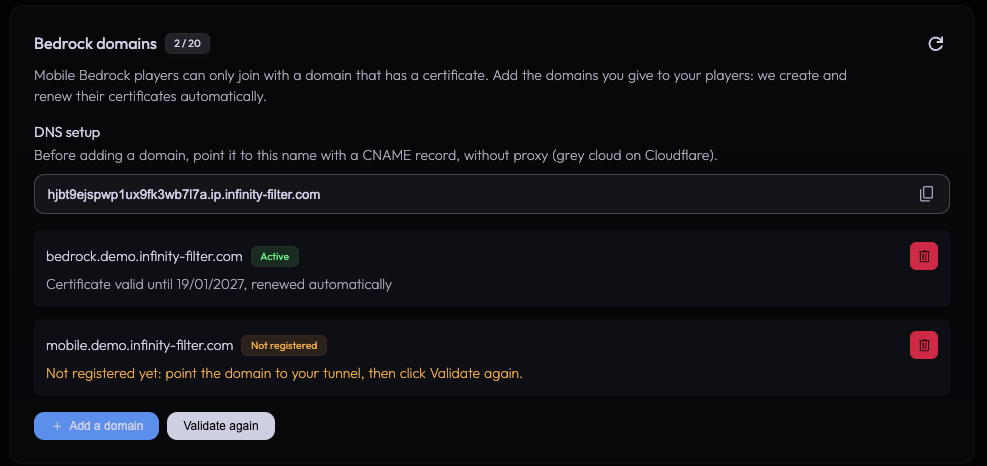
Fix the DNS, then click Validate again. Infinity-Filter sends the domains again: those whose DNS is right get their certificate, the others show what’s wrong and which record to create.
Infinity-Filter also retries on its own when your Geyser routes come back (new dedicated IP, network reactivated…).
Renewal
Certificates are renewed automatically, 30 days before they expire. Keep the CNAME in place: if the domain stops pointing to your tunnel, the renewal fails and the domain shows DNS error until you fix it.
Wildcard domains
A wildcard such as *.example.com gives one certificate to every direct subdomain (play.example.com, eu.example.com…). It needs the wildcard domain option of your plan, and two DNS records, created once:
; Players land on your tunnel.
*.example.com.                300   IN   CNAME   {uid}.ip.infinity-filter.com.

; Lets Infinity-Filter validate and renew the wildcard certificate for you.
_acme-challenge.example.com.  300   IN   CNAME   {id}.acme.infinity-filter.com.
How to do it:
- 1
Add the wildcard
Click Add a domain and type
*.example.com. The first time, the dialog shows the two records to create — including your own{id}, which only the panel knows. Copy it from the panel, never guess it. - 2
Create the two records
Create both records at your DNS provider, DNS only.
- 3
Try again
Click Try again. The wildcard certificate takes about 15 seconds. After that, everything is automatic — just keep both records in place.
Limits of a wildcard:
- One level only:
*.example.comcoversplay.example.com, nota.b.example.com, and notexample.comitself. - A domain you add exactly (for example
play.example.com) keeps its own certificate, which takes priority over the wildcard.
Using a domain on several networks
The same Bedrock domain can be added to several networks of your account — for example one network in NA and one in EU. Add it on each network, like any other domain.
A shared domain needs one more DNS record, the _acme-challenge CNAME, so that each network can get its own certificate:
; Lets Infinity-Filter validate and renew the certificate on every network.
_acme-challenge.bedrock.example.com.  300   IN   CNAME   {id}.acme.infinity-filter.com.
If it’s missing, the domain isn’t added and the panel shows the exact record to create — copy it from the panel, never guess the {id}. Create it (DNS only), wait a minute, then click Try again. Once the certificate is active, the record stays shown under the domain as a record to keep: don’t remove it, the renewals need it.
Players join the network the domain points to. A domain used by a network of another account is still refused.
Rules and limits
20 domains per network Wildcards count as one domain.
Shared between your networks A domain can be added to several networks of your account (NA and EU for example). It then also needs the _acme-challenge CNAME shown by the panel. See Using a domain on several networks.
One account per domain A domain used by a network of another account is refused ("already used by a network of another account").
Separate from Java domains Your Bedrock domain points to the dedicated IP, your Java domain to a front-* hostname: they must be different names. Don't add a Bedrock domain to the Java domains table.
No proxy in front Players and certificate checks must reach your dedicated IP directly. Cloudflare orange cloud is not supported.
Root domain Most DNS providers don't allow a CNAME on the root (example.com). Use a subdomain, or a CNAME-flattening / ALIAS record if your provider offers one (still DNS only).
Dedicated IP changes Nothing to do: your CNAME points to the hostname, which follows the new IP automatically.
Deleting a domain
Click the delete button next to the domain and confirm.
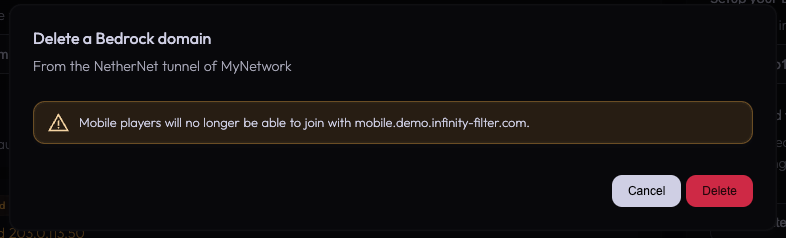
Mobile players can no longer join with that domain. If you add it back within 30 days, its certificate is reused instantly. You can then remove the CNAME at your DNS provider if you don’t use it anymore.
API
Bedrock domains can also be managed with the Infinity-Filter API (token with the Domains permissions). The endpoints are documented in our Postman workspace.
FAQ
Do I need to enable HTTPS in Geyser?
No — and you must not. Infinity-Filter serves the certificate to the players and talks to Geyser in plain HTTP. Leave bedrock.signaling.builtin.https empty in Geyser's config.
Can my players join with the IP instead of the domain?
Phones and tablets: never, there is no certificate for an IP. Other platforms may connect after a security prompt. Always give your players the Bedrock domain.
Do I need one domain per Geyser server?
No. All the Geyser backends of a network share the same dedicated IP and the same Bedrock domains; Infinity-Filter spreads players between them.
Can I use my Java domain for Bedrock?
No. A hostname can only have one CNAME: your Java domain points to a front-* hostname, your Bedrock domain to the dedicated IP hostname. Use two names, for example play.example.com and bedrock.example.com.
Can I use the same domain on my NA and EU networks?
Yes, as long as both networks are on your account. Add the domain on each network and create the _acme-challenge CNAME shown by the panel. See Using a domain on several networks.
What happens if I switch my Geyser backends back to RakNet?
Your Bedrock domains are kept, ready for when you switch to NetherNet again. They are only useful with NetherNet.
What’s next
Last updated: October 22, 2026