Backends
Java backends, module backends, dedicated IPs and PROXY protocol — the Backends page in detail.
A backend is one of your real servers behind Infinity-Filter. Backends come in two shapes:
- Java backends — your Minecraft proxy or directly your Spigot/Paper server, addressed as
ip:port. - Module backends — Geyser, PlasmoVoice, SimpleVoiceChat or Votifier, each exposed as a dedicated module that runs on top of a dedicated IP.
Where to find it
Open Network → Backends.

Top of the page:
- A Dedicated IP card — status if you’ve ordered one, otherwise an Order Dedicated IP button.
- Two filter chips: Java Backends and Module Backends with quotas like
2 / 5. - An Add backend button.
Java and module backends are mixed in the list and filtered via the chips.
Right-hand panel:
- The Geyser (Bedrock) card, when the network has Geyser backends — see below.
- The NetherNet PROXY protocol (UDP) card, when the network has a Geyser backend using NetherNet — see below.
- PROXY protocol toggle (with the Forward plugin download + per-network token when off). It’s on by default on new networks.
- Load balancing mode select.
Adding a Java backend
Click Add backend → keep Java → enter ip:port and an optional note (16 characters max).

- IPv4:
203.0.113.10:25565 - IPv6:
[fd42:42:42::1]:25565
Both work for Java and Geyser backends.
Adding a module backend
Click Add backend → pick Module (Geyser, Votifier,…) → pick the module type:

- Geyser — Bedrock players via Geyser. Requires a dedicated IP and at least one Java backend. Up to 10 Geyser backends per network, all on the same transport (NetherNet or RakNet). See Geyser (Bedrock).
- PlasmoVoice — voice chat via PlasmoVoice. Requires a dedicated IP. See PlasmoVoice integration.
- SimpleVoiceChat — voice chat via SimpleVoiceChat. Requires a dedicated IP. See SimpleVoiceChat integration.
- Votifier — vote receipts through Infinity-Filter, hiding the backend IP from voting sites. Requires a dedicated IP. See Votifier integration.
Backend cards
Each entry in the list shows the backend’s type, address, label, and an edit/delete action.
For Java backends, there’s an additional MOTD indicator: only the first backend in the list is queried for MOTD, and all domains share it.
The power button disables a backend without deleting it: no new player is sent to it until you enable it again. Handy to take a server (or a Geyser server) out of rotation for maintenance.
How to install? opens the install instructions for that backend — for Geyser, the exact Geyser config to use.
The Geyser (Bedrock) card
When your network has Geyser backends, the Geyser (Bedrock) card shows the Bedrock transport they use and lets you:
- Show the Geyser config — the config to put in every Geyser server, with your port filled in.
- Switch to NetherNet / Switch back to RakNet — applies to every Geyser backend of the network at once, without disconnecting players already connected. Switching back to RakNet only works with Geyser builds older than 1280.
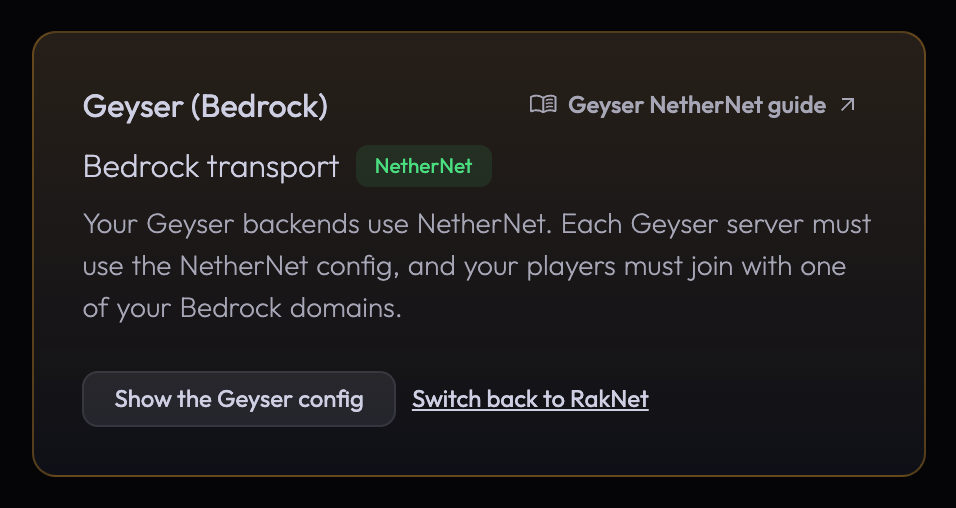
Since Bedrock 26.60 (October 27, 2026), up-to-date players only connect through NetherNet, and Geyser 1280 no longer has RakNet. See Geyser (Bedrock).
The NetherNet PROXY protocol (UDP) card
When your network has a Geyser backend using NetherNet, the NetherNet PROXY protocol (UDP) card lets Infinity-Filter add a PROXY protocol header in front of every NetherNet UDP packet, so Geyser gets the right player IP for every join — friend joins through MCXboxBroadcast included. It’s off by default and never turned on automatically. Turning it on or off opens a confirmation dialog with the Geyser config to apply: change Geyser at the same time, or Bedrock players can’t join. See NetherNet PROXY protocol (UDP).
Real-IP forwarding
To make your backend see the real player IP instead of the Infinity-Filter edge, pick one of two mutually exclusive mechanisms:
- PROXY protocol (recommended, on by default on new networks) — toggle on the right-hand panel + a one-line flag in your proxy software.
- Infinity-Filter plugin — drop the plugin JAR into your backend’s
plugins/folder with a per-network token.
Load balancing
Available on Pro plan and above. When you have multiple Java backends, the Load balancing select on the right-hand panel controls how new players are distributed.

| Mode | What it does |
|---|---|
| Random | Each new player goes to a random backend. |
| Least | Each new player goes to the backend with the lowest current player count. |
| Round Robin | Each new player goes to the next backend in order. |
Fault-tolerance is automatic. If a backend stops accepting connections, new players are routed to the remaining healthy backends. Existing connections are preserved on their current backend during a rotation — players already on backend A don’t get bounced when backend B comes back.
See Load balancing for the rules and the per-mode trade-offs.
Deleting a backend
Click the delete icon. Existing players on that backend keep their connection until they disconnect — only new connections route to the remaining backends.
Geyser needs a Java backend: while the network has Geyser backends, its last Java backend can’t be deleted or disabled — delete the Geyser backends first.
Dedicated IP
The dedicated-IP card at the top of the page is the entry point for Bedrock / Geyser / voice. It shows your dedicated IP hostname ({uid}.ip.infinity-filter.com) — the target of your Bedrock domains’ CNAME. See Dedicated IPs.
Plan limits
The chips above the list (2 / 5 Java, 1 / 3 Module) show your plan quota. To raise the limit, open Billing → Plans.
What’s next
Last updated: November 1, 2026